Built to Scale: B2B Platform for a Multi-Country Franchise
- Domain
- E-commerce · FoodTech
- My Role
- Sole Product Designer
- Scope
- End to end: research, visual design, prototyping, testing, handoff
- Duration
- 2 years
Context
A bakery and pastry franchise runs across 4 countries in Latin America. Their old admin panel only handled basic store and product management, and as the business grew, it could not keep up. I joined as the sole product designer and, over 2 years, turned it into a full ERP system.
What I did
- 01Audited the legacy admin platform and mapped operational gaps
- 02Designed 15+ modules for a franchise ERP system as the sole designer
- 03Built multi-country catalog system supporting 3 product types and per-channel pricing
- 04Designed real-time order management with integrated call center
- 05Created delivery zone system with geographic mapping
- 06Redesigned customer-facing and delivery operator apps
Ecosystem
The franchise ran three connected products: an ERP for HQ and franchise managers, a customer app for ordering, and a delivery app for couriers. A change in the ERP (menu, prices, promotions, delivery zones) updated both apps right away. I designed all three. This case focuses on the ERP, the core of the system.
What wasn’t working
The ERP started as a basic admin panel and grew piece by piece. Five things blocked daily work:
- Stock edited straight in the database
- No way to manage discounts or promotions
- Call center on a separate platform
- Broken, hard-to-use navigation
- No way to scale to new countries
How I worked
I matched the depth of the process to how uncertain the problem was.
Design approach
When the problem was clear (catalog, orders)
- Map with developers
- Design
When users were struggling (call center, delivery zones, payments)
- Study competitors
- Map flows
- Options
- Test
- Choose
Across every module
- Daily with PM, devs, stakeholders
- Stakeholder interviews
- Hallway tests
- Prototypes for complex flows
Order of work
- 1
Foundations
dependency-driven
- Catalog
- Orders
- Stock
Catalog first, everything builds on it.
- 2
User-flagged pain
from user feedback
- Call center
- Delivery zones
- 3
Expansion
once the core was stable
- Finance
- Marketing
- and more
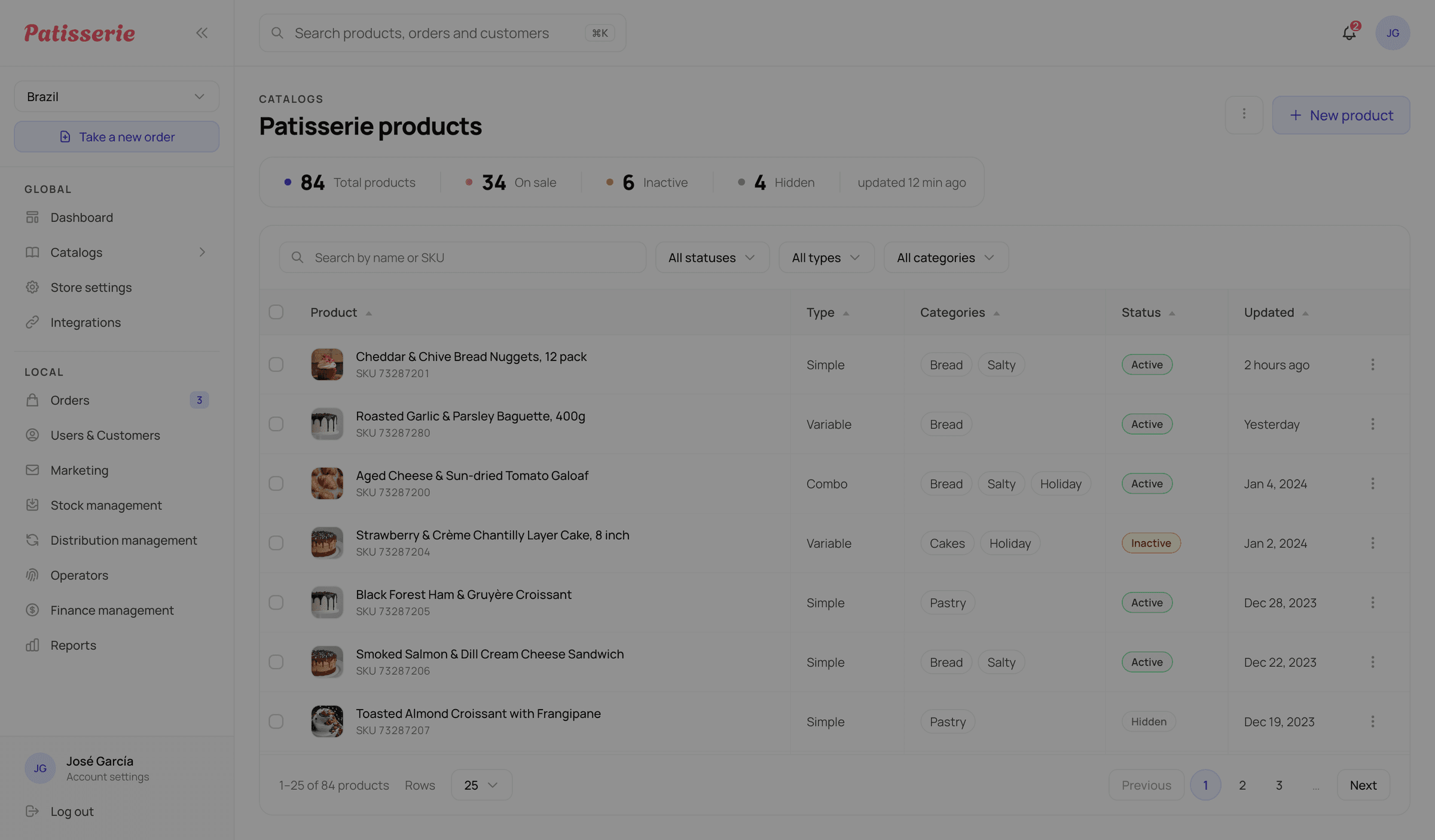
Menu management
Turn one flat product list into a catalog that works across 4 countries and 3 product types.
The catalog had to handle products across 4 countries, with different currencies, sales channels, and 3 product types. The old system was just one flat list.
Foundational move
I mapped the product data model with devs first.
Product
type switches the structure three ways
Simple
Standalone. No sub-structure.
Variable
Variants 1..nEach variant is a sellable option with its own SKU, unit and media.
Combo
2..n productsA bundle made of Simple products. It links to them instead of owning them.
Shared by all three
Categories + Badges
Main category, up to 5 others, one badge.
Channels
Which sales channels sell it.
Country pricing
Cost, then price, then margin. Set for each country.
Split the catalog in two
Why: Own products and third-party products have very different supply chains and workflows. So I split them into two separate catalog sections instead of forcing them into one. It is a bit more to manage, but the difference is clear at a glance and each workflow stays clean.
Considered
One shared catalog
Puts own and third-party products in one structure, even though their supply chains are different.
Chose
Two separate catalogs
A bit more to manage, but the difference is clear and each workflow stays clean.
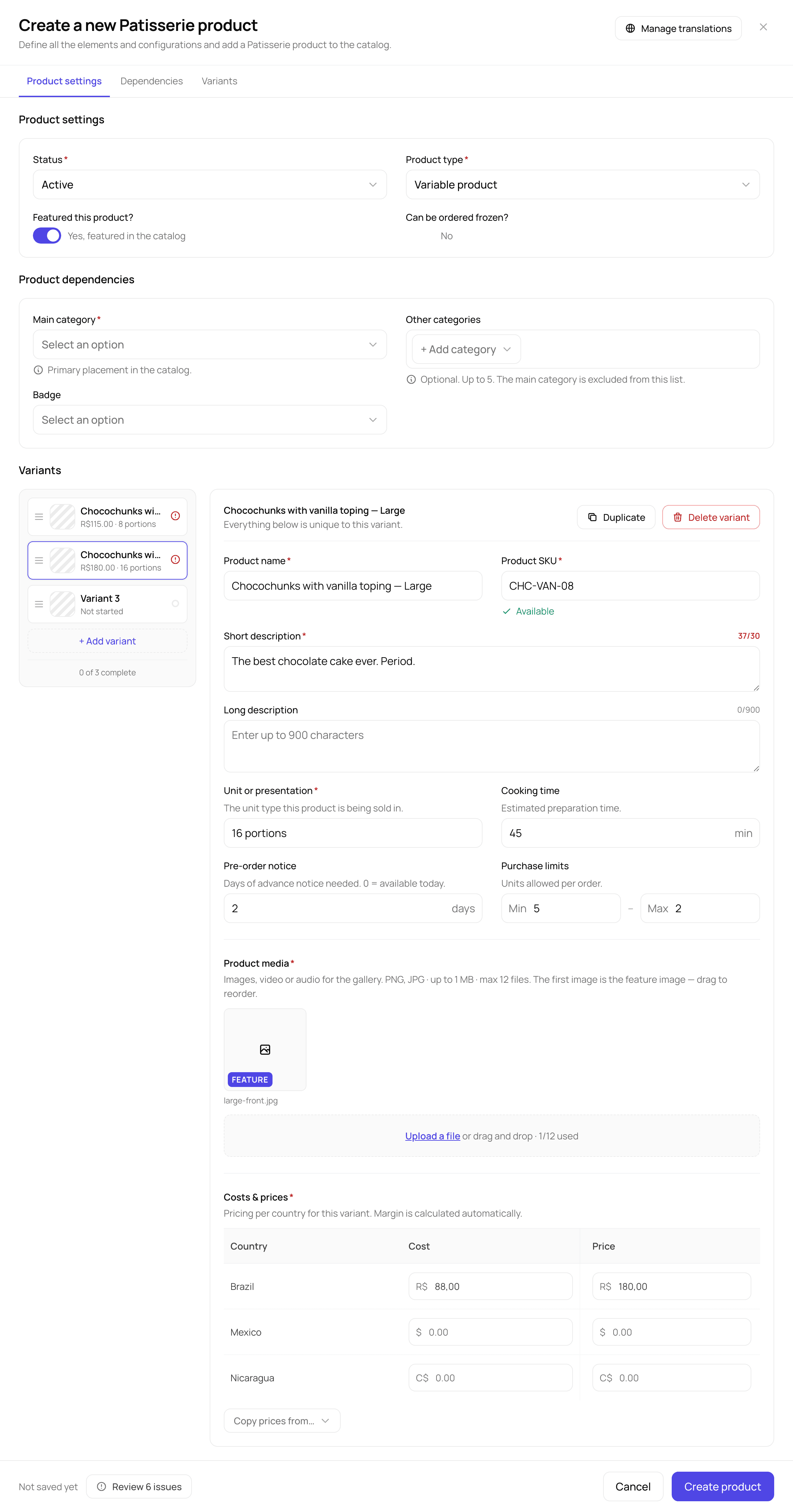
Rebuild product creation into a step-by-step flow
Why: The old form was one packed page. I split the new one into 3 steps: Product settings, Dependencies, and Variants. It checks for errors as you go, handles pricing per country, and shows which variants are done.
Give operators drag-and-drop ordering
Before, changing the product order in the customer app needed a developer. I replaced it with drag-and-drop sorting, so operators can do it themselves.
Order management
Bring app, call center, and third-party orders into one place operators can trust.
There was no single place to see all orders. Orders from the app, the call center, and third-party platforms lived in different places. Third-party orders were almost invisible. For a business doing real-time delivery across 4 countries, that is a serious blind spot.
Foundational move
I mapped the full order lifecycle with the PM and dev team first, before I designed a single screen.
App
Types
Payment
Call center
Types
Payment
Credit and bank transfer are corporate/business only.
Third-party
Types
Payment
One order record
source-taggedOne list, regardless of where it came from.
Shared status pipeline
- Scheduled
- Processing
- Packing
- Assigned
- On route
- At the door
- Completed
- Exits the flow:
- Failed
- Cancelled
Bring every source into one tagged list
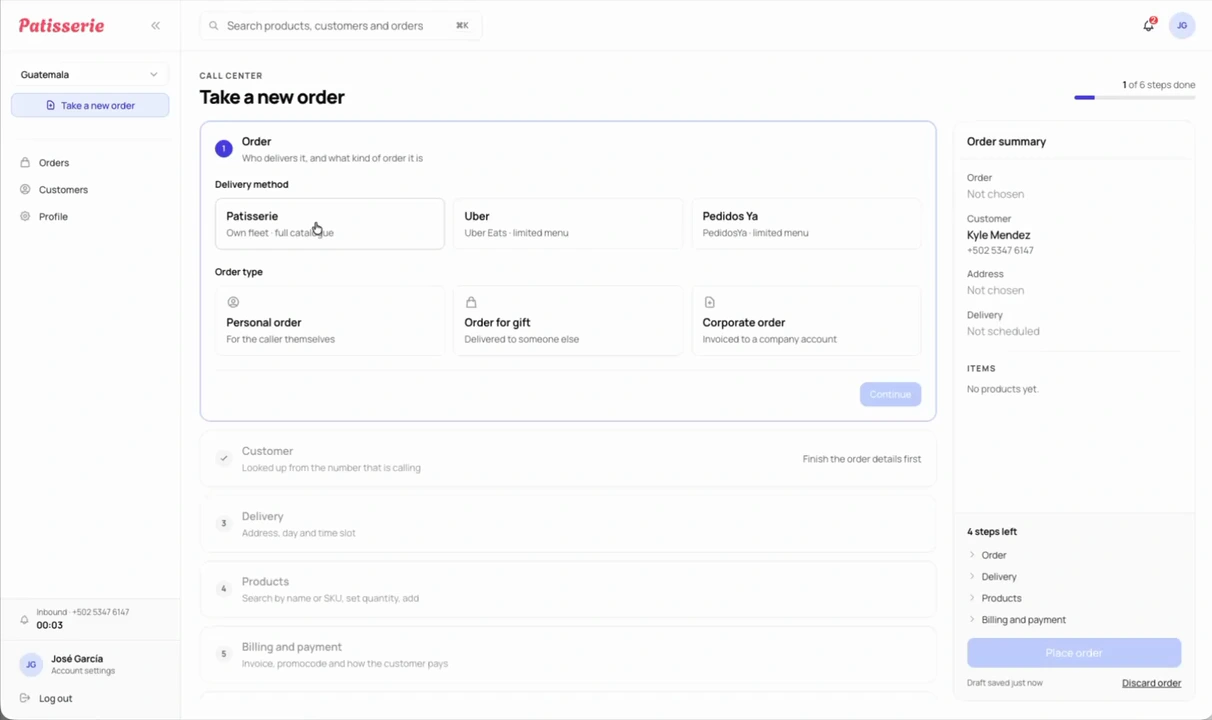
Build call-center creation for speed
Why: Someone is waiting on the phone, so I built the flow to save seconds at every step.
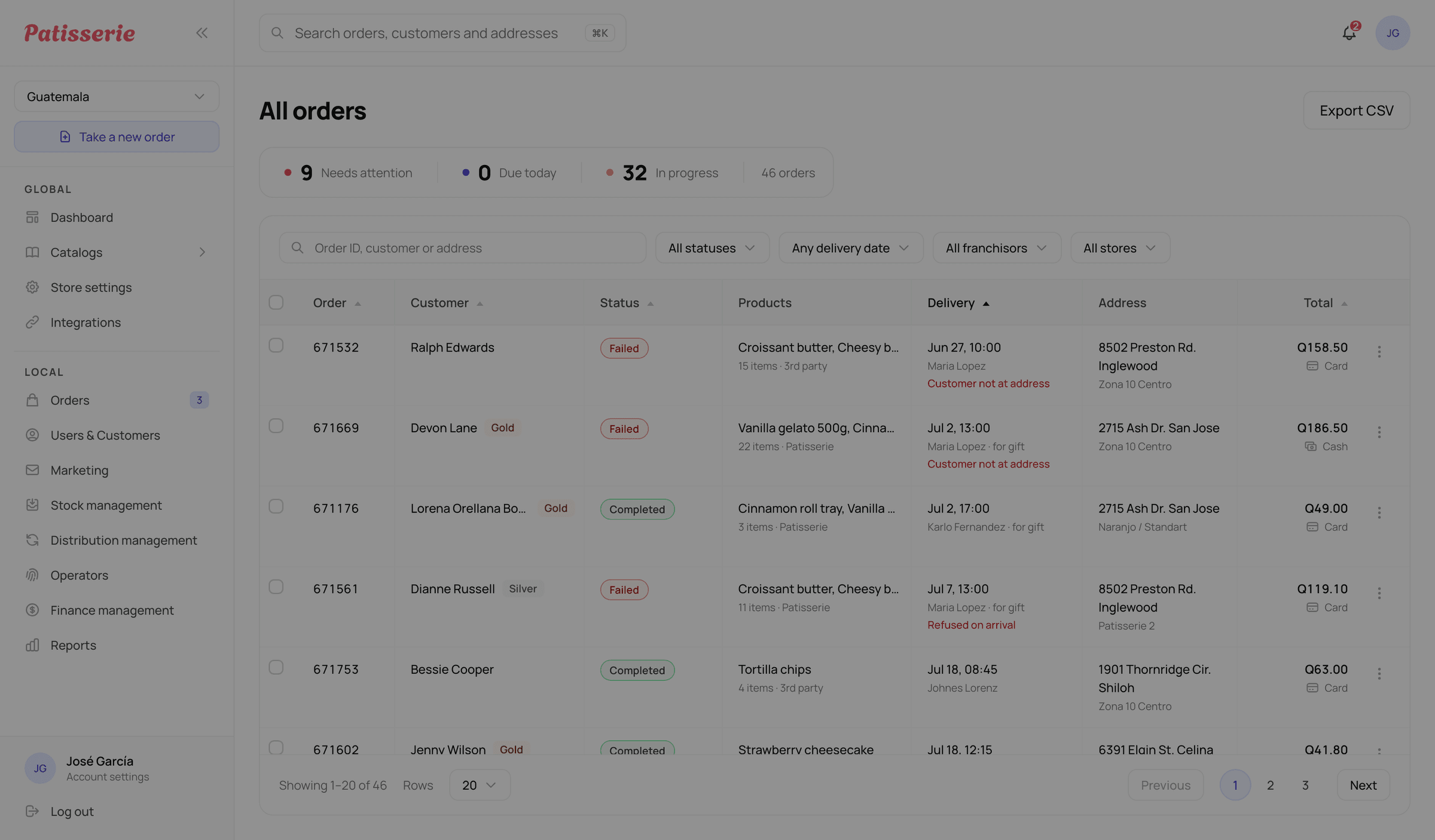
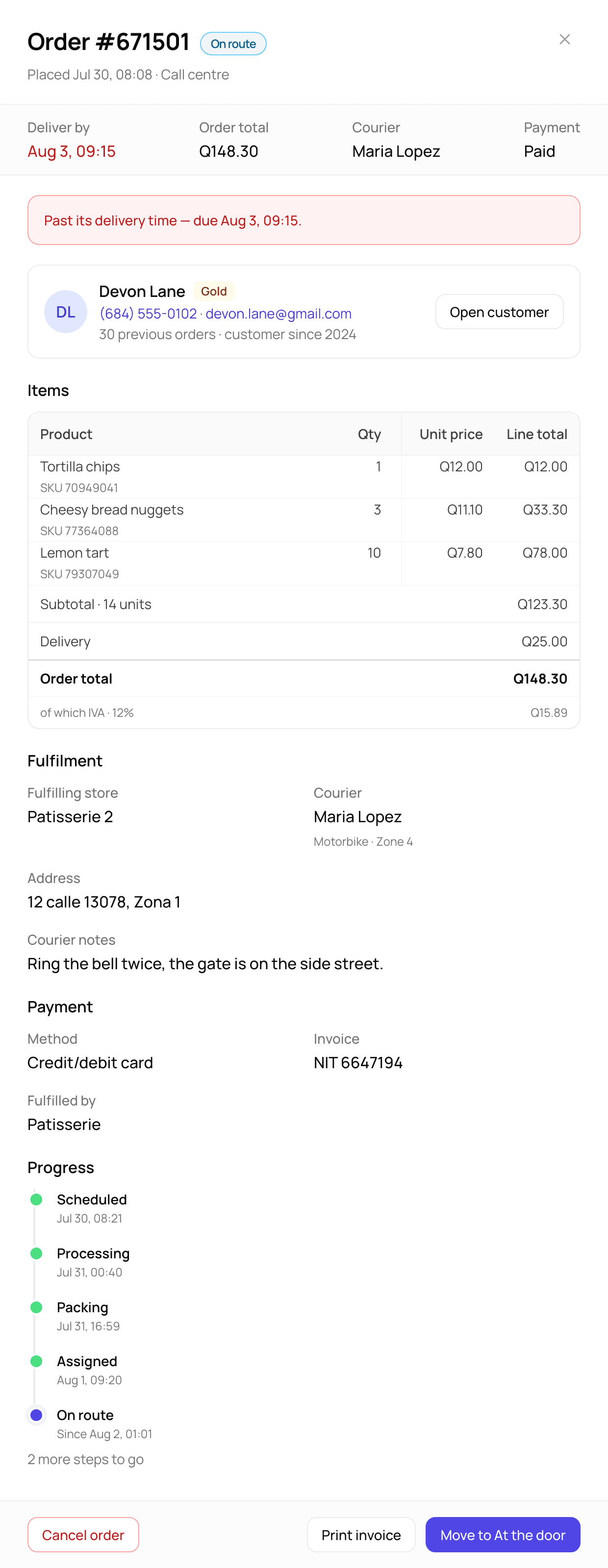
Open order detail as a side panel
Why: Going to a separate detail page made operators lose their place in a long list. So the details open in a side panel, and the list stays visible.
Stock request
Turn stock changes from silent database edits into a tracked, multi-role flow.
Store managers changed stock straight in the database. There was no history, no accountability, and no way to compare what was ordered with what actually arrived. Across many countries, the stock slowly drifts away from reality.
Foundational move
I mapped the handoffs between store managers, distributors, and the system first. Then I designed stock as a tracked flow, not just a form.
Stock request flow: the store manager creates a request. The distributor accepts and ships it, adjusting quantities if needed. The store manager then reviews the delivery, gives a reason for any discrepancy, and stock updates automatically only after that review.
Store manager
1Creates request
Distributor
2Accepts & ships
Can adjust actual quantities.
Store manager
3Reviews delivery
Store manager
4Discrepancy needs a reason
Accountability gate.
Store manager
5Stock auto-updates
Only after review.
Show live stock at the moment of the request
Why: To stop bad requests from the start, I made creation two steps. First you pick products and see their current stock. Then you set quantities, with amounts the system suggests.
One simple portal, scoped to each partner’s own products
Why: Distributors and suppliers are not ERP users. They are separate companies doing one small task. The internal distribution team handles Patisserie (own) products. External suppliers, like Coca-Cola, handle their own third-party products. It is the same screen for both, and it automatically shows each partner only the requests for their own products.
Considered
The full ERP views
Too much for outside companies that rarely use the system and do just one task.
Chose
One simple portal, scoped by product
One feature only: accept the request and change its status. Each partner sees only what is theirs.
This follows the same split as the catalog in Menu management, own vs third-party products. That split decides who fulfills what.
Update stock from what actually arrived
Why: The partner enters what they are delivering. The store manager enters what actually arrived. Stock updates from the received count and compares it with the partner’s delivery amount. So the numbers match what is really in the store, and any gap is easy to see.
Considered
Auto-update from the ordered quantity
No manual step, but the stock drifts from reality whenever less arrives.
Chose
Update from the confirmed received count
Checked against the partner’s delivery amount. One manual step, but the stock always matches the shelf and every gap is visible.
The scale of it
- Catalog
- Orders
- Call center
- Delivery zones
- Stock
- Distribution
- Finance
- Marketing
- Discounts
- Badges
- Users & roles
- Customers
- Customer app
- Delivery app
- Settings
…and more: finance reports, apps settings, notifications, translations.
Results
A basic admin panel became a full ERP system that runs daily operations across 4 countries.
Operational impact
- App, call center, and third-party orders in one view.
- Real-time order visibility across all channels.
- Stock tracked end to end.
- Every unit tracked from request to delivery to shelf.
Business impact
- The franchise can expand without custom development.
- New countries plug into the same platform.
Other Works
Healthcare · Matchmaking · B2B + B2C · Web + Mobile
Mental Health Marketplace
Coordinators spent up to 24 hours matching each patient to a therapist. I redesigned matching and booking so it takes under 2 minutes, and no-shows dropped by about half.

Healthcare · Marketplace · B2B + B2C · Web
MedBase: Medical Content Marketplace
Public video search, an upload flow for doctors, and a B2B portal where reps commission and manage medical content.